
How to search through large WordPress category and tag lists instantly
If you have hundreds of categories or tags, the default WordPress taxonomy checklist in the post editor becomes a problem. Scrolling through a long list to find the right term is slow and error-prone – and there’s no native search.
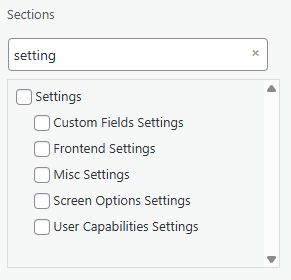
ToggleWP’s Search Filter module adds a real-time search box to any taxonomy checklist.

How it works
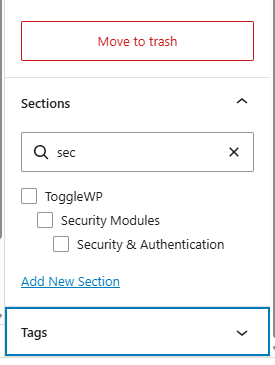
Once enabled, a search input appears above every taxonomy checklist in the post / block editor. Type to filter – matching terms appear instantly, non-matching ones are hidden.
For hierarchical taxonomies (like categories with parent/child relationships), parent terms are preserved in the results even when the search doesn’t match them directly. This keeps the hierarchy readable when you find a child term.
Works on all post types
The search works on any post type with taxonomies attached – posts, pages, WooCommerce products, custom post types. No configuration per post type required.
Zero configuration
Enable the module and it works. No settings to adjust, no selectors to define.
Who this is for
Sites with:
- Large category structures (news sites, e-commerce with many product categories)
- Extensive tag libraries
- Custom taxonomies with many terms
- Multiple editors who need to tag content quickly and accurately
It’s a small improvement to a daily friction point. For editors who tag content regularly, having a search box instead of a scroll list is noticeably faster.