
How to find out if anyone is actually reading your blog posts (without Google Analytics)
Pageviews tell you someone visited. They don’t tell you whether they read the first paragraph and left, or scrolled all the way through. For content sites, the difference matters.
ToggleWP’s Scroll Tracking module gives you per-page scroll depth data – with no third-party scripts and no personal data collected.
What it tracks
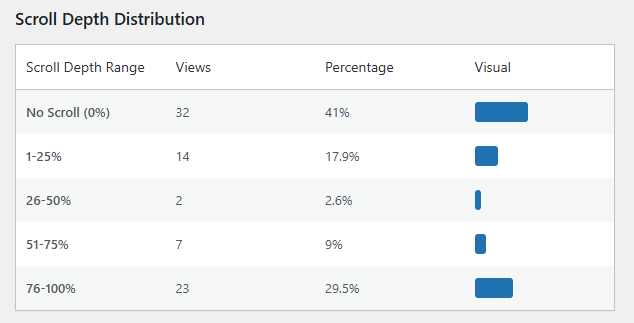
Every visit is recorded against one of five scroll depth ranges:
- 0% (page loaded, no scroll)
- 1–25%
- 26–50%
- 51–75%
- 76–100%
You get a distribution showing how far visitors typically get through each page.
Privacy by design
No IP addresses are stored. No third-party analytics script is loaded. Data stays in your WordPress database and isn’t shared with any external service.
For sites with privacy-conscious audiences – or those needing GDPR compliance without consent banners for analytics – this is a meaningful difference from Google Analytics or similar tools.
Viewing the data
A Scroll Summary dashboard shows aggregate view counts and depth distribution charts. Each post and page also gets a row action link in the admin list view – one click to see the scroll data for that specific piece of content.
When you’re browsing the frontend, an admin bar link takes you directly to the scroll summary for the current page.

CSV export
Export scroll data with date range selection for offline analysis or client reporting.
Configuration options
- Auto-inject tracking script across all content, or use the
[wat_scroll_tracker]shortcode for specific pages only - Exclude logged-in admins from tracking
- Exclude specific IP addresses
- Set data retention period (default: 30 days, max: 365 days)
If you’re writing long-form content and want to know whether anyone gets past the introduction, scroll tracking is the most direct answer available.